Photo.
Explore the possibilities.
Edit photographs and layered graphics in your browser with selections, masks, color adjustments, painting, editable text, vector shapes and image export.
Open Photo ↗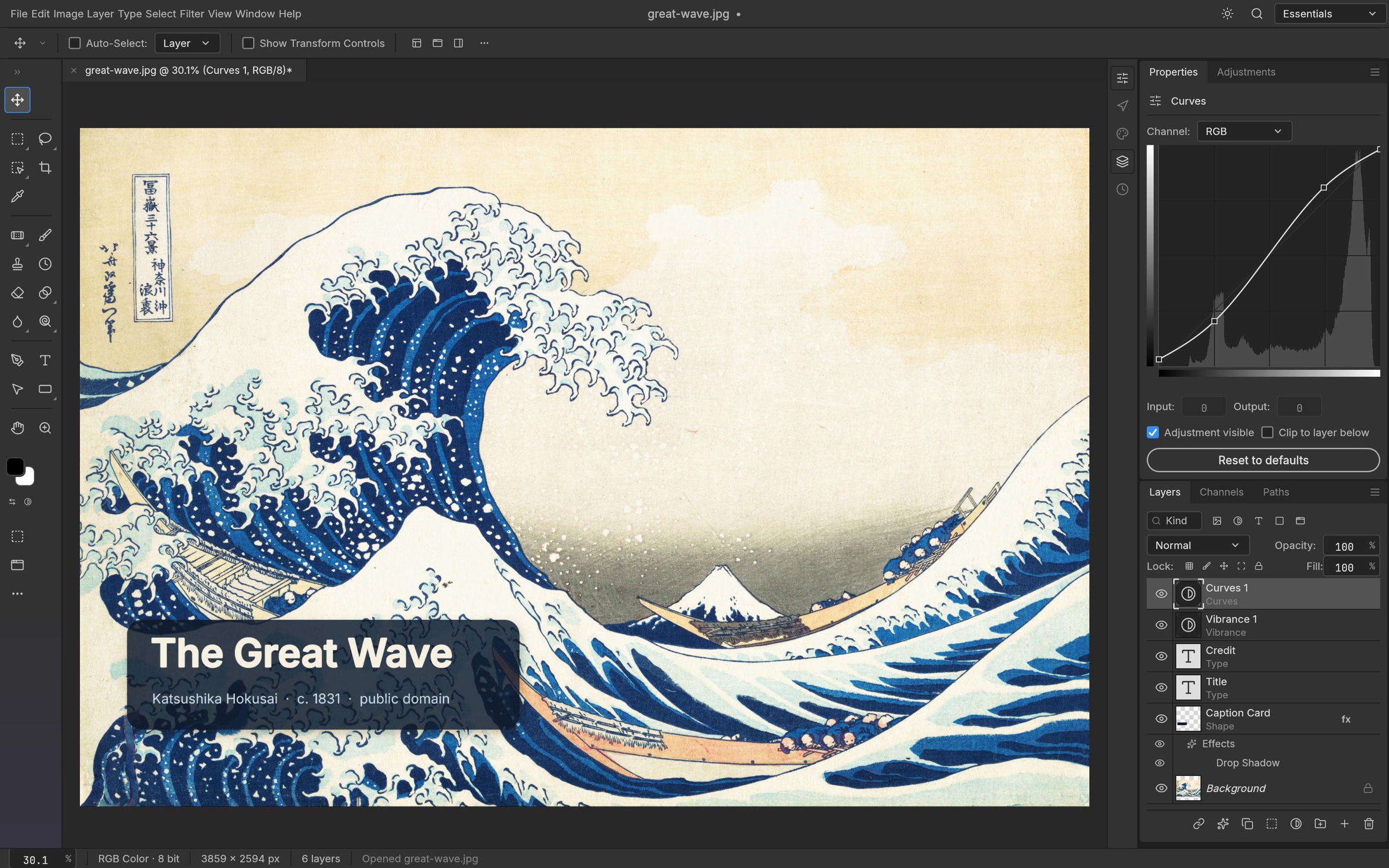
Feature guides
Open, edit and save your first photo
Start a browser editing session and keep an editable copy of your work.
Feature guideLayers, groups and blend modes
Build a composition from independently editable image, text, shape and adjustment layers.
Feature guideSelect objects and regions
Limit edits to a chosen area with geometric, freehand and image-aware selection tools.
Feature guideMasks and channels
Hide, reveal and isolate image content while preserving editable layers.
Feature guideExposure, color and adjustment layers
Correct tone and color with controls you can revisit.
Feature guideShadows, outlines and layer effects
Style text, shapes and image layers with effects that remain adjustable.
Feature guideBrushes, painting and presets
Paint with configurable tips, dynamics, color and stroke behavior.
Feature guideHeal, clone and retouch photographs
Repair small distractions and make localized tonal changes.
Feature guideAdd and format editable text
Create headlines, labels and captions directly on a photograph.
Feature guideDraw shapes, paths and vector masks
Build badges, frames and precise outlines with editable vector geometry.
Feature guideCrop, resize and transform
Change framing, dimensions and placement without confusing image size with canvas size.
Feature guideFilters and smart objects
Preview effects and preserve revisable filter settings where possible.
Feature guideColor management and camera RAW
Understand profiles, bit depth and the limits of camera-file support.
Feature guideSave, export and exchange files
Choose between an editable master and a finished image for sharing.
Feature guideWorkspace, navigation and history
Arrange the view, inspect your work and recover from an edit.
Feature guidePatterns, presets and recorded actions
Reuse visual settings and repeat a sequence of edits.
Detailed reference
Choose precise colours and sample pixels
Understand text colour targets, colour spaces, document sampling and browser screen-picking support.
ReferenceRead Camera Raw histograms and scopes
Use tonal zones, clipping warnings, colour probes and vectorscopes while understanding preview and PSD limits.
ReferenceNavigate the Camera Raw preview
A control reference for zoom, pan, Fit, actual size and Before/After, with browser-specific preview limitations.
ReferenceStyle shape outlines with dashes, caps and joins
Learn the difference between new-shape defaults and existing-shape edits, with precise stroke-pattern and alignment rules.
ReferenceOpenRaster: what layered .ora files preserve
A detailed format reference covering retained layers, conversion warnings, unsupported features and a safe exchange workflow.
ReferenceOpen Krita files without losing track of compatibility
A detailed format reference covering retained layers, conversion warnings, unsupported features and a safe exchange workflow.
ReferenceOpen Paint.NET layers and preserve special blend modes
A detailed format reference covering retained layers, conversion warnings, unsupported features and a safe exchange workflow.
ReferenceKeep an editable master with .pcraft
Understand what a native Photo project contains, how it differs from an image export and why a browser download is your saved copy.
ReferencePSD and PSB: editable exchange and fidelity limits
Understand PSD versus PSB, retained data versus editable features, and how to check a Photoshop exchange.
ReferenceOpen and place SVG artwork
Detailed import behaviour, what stays editable, what is rasterized or approximated, and how to recognize conversion limits.
ReferenceImport Affinity documents and recognize preview fallbacks
Detailed import behaviour, what stays editable, what is rasterized or approximated, and how to recognize conversion limits.
Open, save, and share
| Format | Open / import | Save / export | Notes |
|---|---|---|---|
| PCraft (.pcraft) | Yes | Yes | Native editable project format. |
| PSD / PSB | Yes | Yes | Layered exchange; inspect complex files and preserve originals. Not all external features are reproduced exactly. |
| TIFF | Yes | Yes | Layered TIFF supported; flat samples support 8/16-bit and 32-bit float. Some TIFF encodings are unsupported. |
| OpenRaster (.ora) | Yes | Yes | Layers, groups and supported blend modes; not a universal container for all live effects. |
| Krita (.kra) | Yes | No | Imports supported paint layers, groups, blend modes and transparency masks. |
| Paint.NET (.pdn) | Yes | No | PDN3 import with editable layers and supported blend modes. |
| Affinity (.af, .afdesign, .afphoto, .afpub) | Yes | No | Imports supported artboards, layers, vectors, text, images and masks; warns about unsupported parts. |
| SVG | Yes | No | Opens as shape layers or places as a vector Smart Object; SVG document export is not claimed here. |
| PNG | Yes | Yes | Lossless, transparency, 8- or 16-bit samples. |
| JPEG | Yes | Yes | Lossy, 8-bit output, no transparency. |
| WebP | Yes | Yes | 8-bit, transparency, lossy or lossless export. |
| GIF | Yes | Yes | Palette-limited image export; ordinary open is not a complete animation-editing workflow. |
| BMP / TGA / ICO / QOI | Yes | Yes | Raster formats with format-specific limits; ICO is limited to 256 × 256. |
| Netpbm (PBM/PGM/PPM/PAM/PFM) | Yes | Yes | Subtype and sample support depend on image layout; float uses PFM. |
| OpenEXR / Radiance HDR | Yes | Yes | Floating-point workflows; multipart, deep or channel configurations have limitations and warnings. |
| FITS / DPX | Yes | Yes | Specialist image formats with supported sample layouts and encoding limits. |
| DDS | Yes | No | Supported 2D top-level textures only; no DDS export. |
| HEIC / HEIF | Yes | No | Enabled in this browser build; supported pictures and grids, not all sequences or HEVC encodings. |
| Camera RAW | Yes | No | Supported encodings develop to 16-bit RGB. Some cameras use embedded JPEG fallback. CR3 native decoding and JPEG XL DNG in browser are unavailable. |
| AVIF / JPEG XL | No | No | AVIF encoding requires an optional feature not enabled in this browser build; AVIF decoding and standalone JPEG XL are unavailable. |
Browser limitations
- PhotoCraft is an early-stage editor; a visible command does not imply complete parity with another application.
- Browser Save and Export download files; they do not overwrite the source file automatically.
- Desktop folder batches, droplets, CLI, MCP and native plug-in hosting are outside the browser interface.
- Some camera encodings use an embedded JPEG preview; CR3 native development and JPEG XL-compressed DNG on WebAssembly are unavailable.
- Complex imported layers, text, effects and color workflows require visual verification; preserve the original document.
- Browser storage can be denied or cleared and is not a substitute for saved project files.
- Performance and pen input vary with browser, device, document dimensions and layer count.
Frequently asked questions
Does Photo upload my image for editing?
The browser file picker passes the selected file to the local WebAssembly editing engine. The editing workflow described here does not require a hosted image-processing service.
How do I save my work?
Use Save or Save As for an editable document and confirm the browser download completes. Use Export As for a finished image. Saving does not overwrite the original file on your device automatically.
Can I open Photoshop files?
Yes. PSD and PSB import and export support layered editing. Complex effects, text and unsupported external features may differ, so keep the original and compare important exchanges in the receiving application.
Can I remove a background?
Use a selection tool to isolate the subject, refine the edge, then create a layer mask with Reveal Selection. Inspect fine edges and export to a format such as PNG when transparency is needed.
Can I add text to a photo?
Yes. Point and paragraph text remain editable in type layers. Character and Paragraph controls set font, size, spacing, alignment and color.
Are adjustments destructive?
Adjustment layers keep their settings editable and can be masked or hidden. Direct Image → Adjustments operations modify the selected image content, so choose the workflow intentionally.
Does Photo open iPhone HEIC images?
This browser build enables HEIC/HEIF import. Support covers supported single pictures and grids, with some encoding limitations. HEIC export is unavailable.
Can I edit camera RAW files?
Supported RAW encodings develop into 16-bit RGB. Some unsupported camera encodings open an embedded JPEG preview instead; review the import warning. CR3 uses preview fallback, and JPEG XL-compressed DNG is unsupported in the browser.
Why did an export change my image depth?
Each format has its own capabilities. JPEG and WebP export use 8-bit samples; PNG can retain 16-bit samples, and TIFF or OpenEXR can serve higher-depth workflows. Read conversion warnings before saving.
Will brushes and preferences survive closing the tab?
Preferences use local storage and brushes use browser storage when available. Denied or cleared storage can remove them. These settings are not a backup of your image document.
Does Photo offer generative fill or Photoshop plug-ins?
These guides do not claim generative fill, Photoshop plug-in compatibility, or desktop CLI/MCP features in the browser. The documented selection and retouching tools operate through the local editing engine.
Can I process an entire folder automatically?
The browser interface does not expose folder handles as filesystem paths. You can record and replay actions on documents, but desktop folder batches and droplets are outside this browser guide.
Is every Photoshop feature supported?
No. PhotoCraft is an early-stage editor with substantial editing functionality, but menu coverage does not mean full workflow parity. Check complex PSDs, typography, camera encodings and specialist exports with your actual files.