Select objects and regions
Limit edits to a chosen area with geometric, freehand and image-aware selection tools.
Applies to Photo 0.9.0 on photo.et.
How it works#
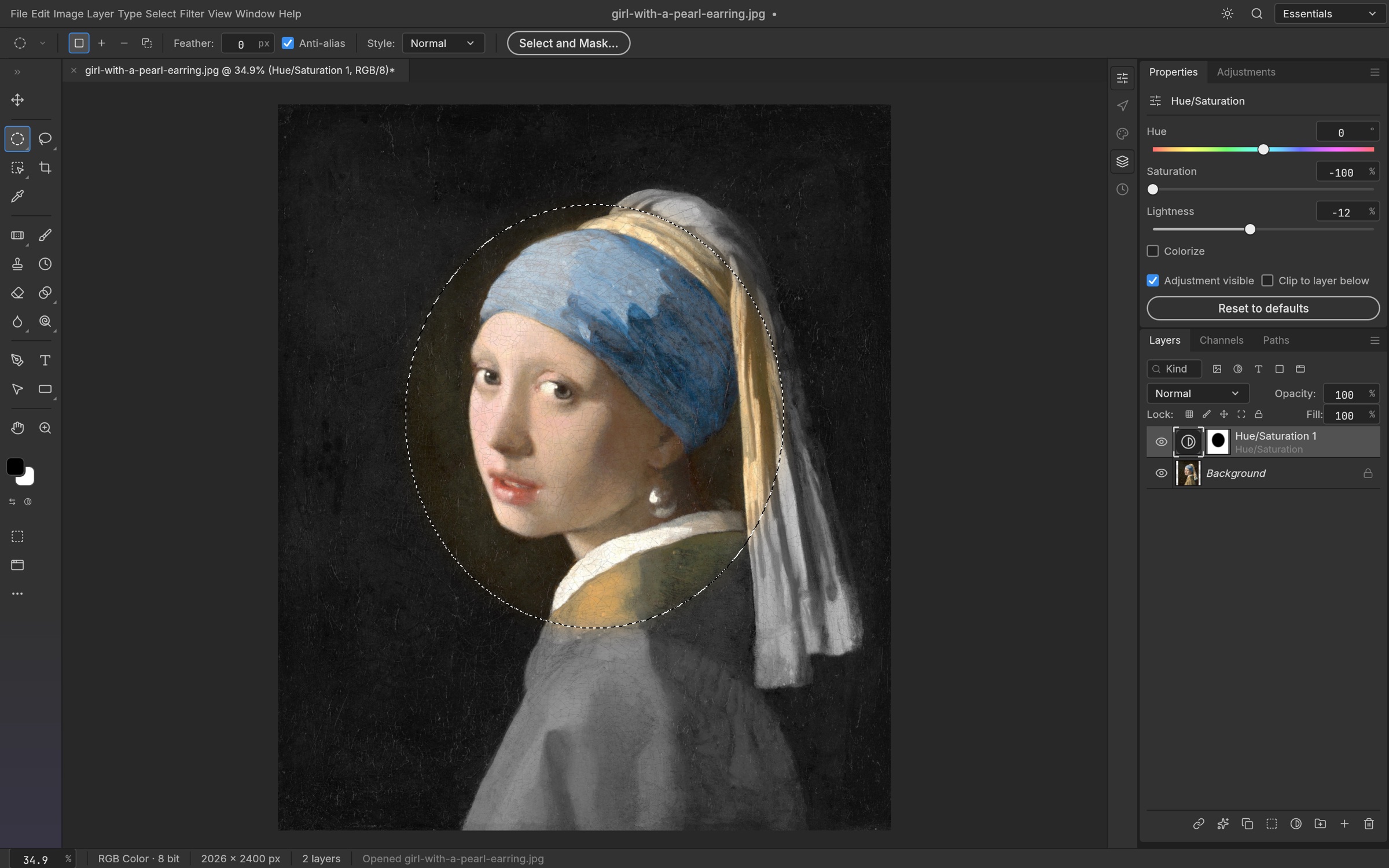
A selection limits where an edit applies. Rectangular and Elliptical Marquee work well for regular shapes; the Lasso family is useful when you need to trace an irregular boundary. Magic Wand selects related colors, while Quick Selection and Object Selection use image information to help build a region. Select Subject offers another starting point for isolating a foreground subject.
Treat an automatic selection as a draft. Inspect the boundary around hair, transparent objects, shadows and low-contrast edges before using it. Add or subtract regions until the result fits the image. Feather softens an edge; expand and contract move it outward or inward; smooth reduces irregularities. These operations affect the selected boundary rather than changing the underlying photograph immediately.
A selection can drive a localized adjustment, become a layer mask or be converted to a path. Masks are particularly useful when you want to refine the isolation later. Select and Mask provides refinement controls, but it should not be assumed to reproduce every aspect of another editor’s dedicated selection workspace. The image-aware tools use local processing, not a hosted generative service.
Try it#
- Choose a selection tool suited to the shape or colors of your subject.
- Inspect and refine the boundary at a useful zoom level.
- Use feathering only when a softer transition is needed.
- Apply the selection to a mask or a localized edit.
Feature reference
- Geometric and freehand selections
- Marquee, Lasso, Polygonal Lasso and Magnetic Lasso offer different tracing methods.
- Image-aware selection
- Magic Wand, Quick Selection, Object Selection and Select Subject help isolate content.
- Refinement
- Feather, smooth, expand, contract, grow and reselect support boundary cleanup.
Sources and edition notes
Adapted for the browser edition from the pinned PhotoCraft 0.9.0 source. Upstream documentation may also describe desktop workflows.
- README.md — Selection feature group.
- crates/ui-egui/src/retouch_ui.rs — Quick and Object Selection gestures.
- crates/ui-egui/src/menu_catalog.rs — Selection commands.
Try it in Photo
Save your work before leaving the editor. Review the editor overview for file formats and browser limitations.
Open Photo ↗