Exposure, color and adjustment layers
Correct tone and color with controls you can revisit.
Applies to Photo 0.9.0 on photo.et.
How it works#
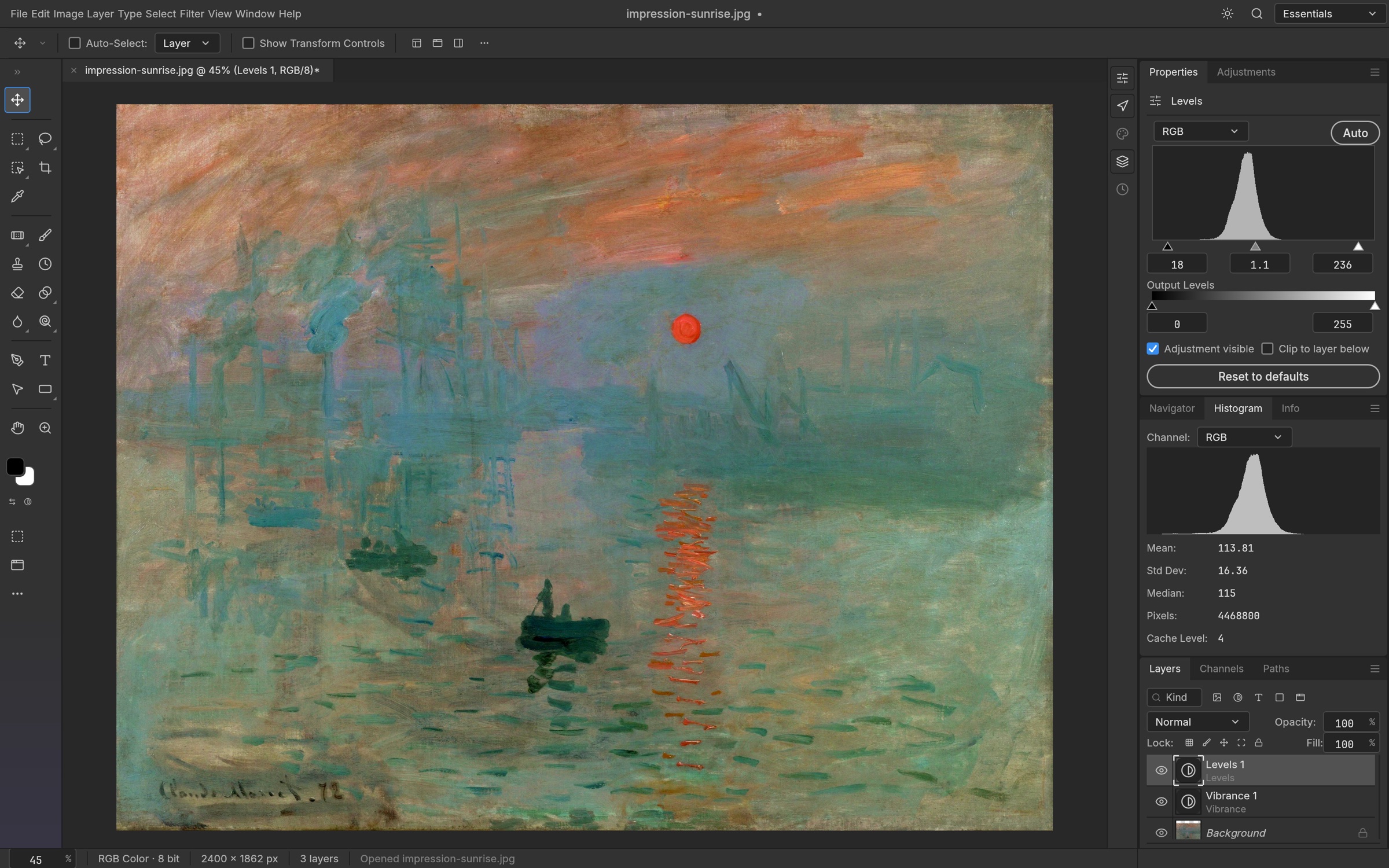
Adjustment layers change the appearance of layers below them while keeping the source image intact. Add an adjustment from Layer → New Adjustment Layer, then edit its settings in the properties controls. Reorder adjustments to change the result, toggle visibility to compare before and after, or use a mask to restrict the correction to one area.
Levels adjusts tonal endpoints and the midtone balance. Curves provides finer control across the tonal range, including individual color channels. Brightness/Contrast and Exposure suit simpler changes; Vibrance and Hue/Saturation control color intensity and hue. Black & White creates a monochrome interpretation, while Color Balance, Photo Filter and Channel Mixer offer other approaches to color correction.
Gradient Map, Posterize, Threshold and Invert support graphic treatments. Selective Color and Color Lookup extend grading options, including supported lookup-table files. Image → Adjustments exposes direct pixel edits as well as additional operations such as Shadows/Highlights. Choose a live adjustment layer when you expect revisions, and reserve direct edits for situations where you deliberately want to commit the change.
Try it#
- Add a Levels or Curves adjustment layer above the photograph.
- Adjust the tonal range while watching the image and histogram.
- Add a color adjustment only if the image needs it.
- Toggle each adjustment and refine its mask before saving.
Feature reference
- Tone
- Brightness/Contrast, Levels, Curves and Exposure control luminance and contrast.
- Color
- Vibrance, Hue/Saturation, Color Balance, Photo Filter and Channel Mixer support grading.
- Creative adjustments
- Black & White, Gradient Map, Invert, Posterize, Threshold, Selective Color and Color Lookup provide alternative looks.
Continue reading
Sources and edition notes
Adapted for the browser edition from the pinned PhotoCraft 0.9.0 source. Upstream documentation may also describe desktop workflows.
- crates/ui-egui/src/adjust_editors.rs — Shared editors for adjustment layers and direct adjustments.
- crates/ui-egui/src/adjust_ui.rs — Selective Color and Color Lookup UI.
- README.md — Adjustment inventory.
Try it in Photo
Save your work before leaving the editor. Review the editor overview for file formats and browser limitations.
Open Photo ↗